
# Plugins
BTCPay Server プラグインは C# で記述されます。 これらはコア機能を拡張し、BTCPay Server のコードと同じコンテキストで実行されます。 プラグイン開発の前提として、ローカル開発 の流れに慣れておく必要があります。
# 新しいプラグインのセットアップ
BTCPay Server 関連プロジェクト用のフォルダを作成します。最低でも次を含めます。
- あなたのプラグインリポジトリ
- BTCPay Server リポジトリのあなたの fork
まずは plugin template (opens new window) をクローンするか、既存のプラグイン を確認すると始めやすいです。 このチュートリアルでは plugin template を例として使います。必要に応じて、参照箇所をあなた自身のプラグインに置き換えてください。
プラグインリポジトリには BTCPay Server をサブモジュールとして含める必要があります。 これにより、BTCPay Server を依存関係として参照でき、既存のコアクラスやモジュールを利用できます。 まず BTCPay Server、次にプラグインをビルドして、参照が正しく機能していることを確認します。
# Clone the plugin template to a new directory called btcpayserver-my-plugin + make sure we get the contents of the submodule too
git clone git@github.com:btcpayserver/btcpayserver-plugin-template.git --recurse-submodules btcpayserver-my-plugin

# Enter the dir
cd btcpayserver-my-plugin

# Build the BTCPay Server project inside the plugin repository
dotnet build btcpayserver

# Build your plugin, which references the BTCPay Server project
dotnet build BTCPayServer.Plugins.Template
プラグインを開発するには、BTCPay Server のソリューションを文脈として使える状態が必要です。 main repository (opens new window) をあなたの GitHub アカウントに fork し、ローカルにクローンしてください。
この時点でフォルダ構成は次のようになります。
|_ btcpayserver # your fork
|_ btcpayserver-plugin-template
  |_ btcpayserver # the submodule
  |_ BTCPayServer.Plugins.Template
開始前に BTCPayServer.Plugins.Template をあなたのプラグイン名に変更します。
また、BTCPayServer.Plugins.Template/BTCPayServer.Plugins.Template.csproj ファイル名も変更してください。
csproj ファイルでは、次のようにプラグイン情報をカスタマイズできます。
  <PropertyGroup>
    <Product>Cool Plugin</Product>
    <Description>My plugin is doing nothing, but it's cool.</Description>
    <Version>1.0.0</Version>
  </PropertyGroup>
# プラグイン参照
fork したリポジトリ側では、Plugins サブディレクトリ (opens new window) 内で ソリューションにプラグインを追加 (opens new window) できます。
# Enter the forked BTCPay Server repository
cd btcpayserver

# Add your plugin to the solution
dotnet sln add ../btcpayserver-plugin-template/BTCPayServer.Plugins.Template -s Plugins
これにより、BTCPay Server の fork と同じ階層にあるプラグインプロジェクトを参照できます。
BTCPay Server 依存関係について
これであなたのプラグインは BTCPay Server ソリューションの一部になりますが、次の点に注意してください。 プラグインが依存する BTCPay Server のバージョンは、fork 側ではなく、プラグインリポジトリにあるサブモジュールです。 最新の BTCPay Server を利用するには、サブモジュールを更新する必要があります。
開発モードでアプリを起動した際に常にメインプロジェクトへプラグインを読み込ませるには、BTCPayServer/appsettings.dev.json ファイルを追加します。
このファイルはリポジトリでは無視され、デバッグ用にローカルでビルドしたプラグインを参照します。
{
  "DEBUG_PLUGINS": "/absolute/path/btcpayserver-plugin-template/BTCPayServer.Plugins.Template/bin/Debug/net8.0/BTCPayServer.Plugins.Template.dll"
}
ローカルファイルシステム上の、プラグインのビルド済み DLL への絶対パスを指定する必要があります。 複数のプラグインを参照したい場合は、セミコロンで区切ってください。
ここまで設定できればアプリをビルド・起動できるはずです。問題があれば起動メッセージを確認してください。 プラグインが読み込まれ、デバッグ可能な状態になります。
ソリューション全体のビルド
アプリ起動時にプラグインを毎回再ビルドしたい場合は、ソリューションに pre-build ステップを設定すると便利です。 run/debug 設定を編集し、BTCPay Server プロジェクト単体ではなくソリューション全体をビルドするように設定してください。
# プラグインの実装
以下のトピックについては、今後さらに情報を追加予定です。 現時点では、最低限押さえておくべきポイントを説明します。
# Assets
アセット(CSS、JavaScript、画像)を参照するには、プラグインプロジェクト側で Resources フォルダを埋め込み (opens new window) 設定する必要があります。
<ItemGroup>
  <ProjectReference Include="..\btcpayserver\BTCPayServer\BTCPayServer.csproj" />
  <EmbeddedResource Include="Resources\**" />
</ItemGroup>
その後、ビュー内では次のようにアセットを参照できます。
<img src="~/Resources/img/my.png" asp-append-version="true" />
<script src="~/Resources/js/my.js" asp-append-version="true"></script>
<link
  href="~/Resources/css/my.css"
  asp-append-version="true"
  rel="stylesheet"
/>
良い実例として、埋め込みリソースを使って BTCPay Server 上で Bitcoin whitepaper PDF を公開する Bitcoin Whitepaper plugin (opens new window) があります。
# Database
BTCPay Server のメインデータベーステーブルは public schema の一部です。 プラグインは、プラグイン名に基づく独自のデータベースコンテキストと schema を持ちます。
public class MyPluginDbContextFactory : BaseDbContextFactory<MyPluginDbContext>
{
    public MyPluginDbContextFactory(IOptions<DatabaseOptions> options) :
        base(options, "BTCPayServer.Plugins.Template") {}
}
プラグイン側で独自のデータモデルと migration を持つこともできます。
# Add a new migration once you defined a new model or updates
dotnet ef migrations add MoreData -p BTCPayServer.Plugins.Template -c PluginDbContext -o Data/Migrations

# Update the database
dotnet ef database update -p BTCPayServer.Plugins.Template -c PluginDbContext
データベースを(psql で)確認する際、デフォルトでは public schema のテーブルのみ表示されます。
プラグインテーブルも表示・選択したい場合は、search path を拡張する必要があります。
# list plugin schemas
SELECT * FROM pg_catalog.pg_namespace WHERE nspname LIKE 'BTCPayServer.%';

# extend search path
SET search_path TO "BTCPayServer.Plugins.Template", public;

# table list now also shows the template plugin tables
\dt
# UI Extension Points
extension point を使うと、プラグインのビューや partial を UI に追加できます。 これらはプラグインのベースクラス内で定義します。 以下の例では、メインナビゲーションにプラグインへのリンクを追加しています。
public class Plugin : BaseBTCPayServerPlugin
{
    public override void Execute(IServiceCollection services)
    {
        services.AddSingleton<IUIExtension>(new UIExtension("TemplatePluginHeaderNav", "header-nav"));
    }
}
この例では、header-nav が extension point の名前です。
利用可能な extension point は、メインアプリ内で vc:ui-extension-point を検索すると確認できます。
header-nav の参照は次のようになっています。
<vc:ui-extension-point location="header-nav" model="@Model" />
ビューや partial(例: TemplatePluginHeaderNav.cshtml)は、メインアプリが検出して読み込めるよう、Views または Pages ディレクトリ内の Shared フォルダに配置する必要があります。
extension point がない場合
UI を拡張したいのに extension point がまだない場合は、追加リクエストとして issue を作成してください。 actions and filters と同様、必要に応じて順次拡張しています。
# Actions and Filters
UI に差し込む extension point に加えて、次のフックを使って挙動を変更・拡張することもできます。
- Action (opens new window): コア機能を拡張する
- Filters (opens new window): 処理を実行しつつデータを返す
UI extension point と同様に、これらはプラグインベースクラスの Execute メソッド内で定義できます。
public class Plugin : BaseBTCPayServerPlugin
{
    public override void Execute(IServiceCollection services)
    {
        services.AddSingleton<IPluginHookAction, MyPluginAction>();
        services.AddSingleton<IPluginHookFilter, MyPluginFilter>();
    }
}
利用可能なフックは、メインアプリ内で ApplyAction と ApplyFilter の呼び出しを検索すると見つけられます。
# Authorization and Permissions
メインアプリの AuthenticationSchemes と Policies を再利用できます。
// Authorize users via their cookie login
[Authorize(AuthenticationSchemes = AuthenticationSchemes.Cookie, Policy = Policies.CanViewProfile)]
public class UIPluginController : Controller
{
    // GET might inherit CanViewProfile
    [HttpGet("")]
    public async Task<IActionResult> Index()
    {
        return View();
    }

    // POST might require CanModifyProfile
    [HttpPost("update")]
    [Authorize(AuthenticationSchemes = AuthenticationSchemes.Cookie, Policy = Policies.CanModifyProfile)]
    public async Task<IActionResult> Modify()
    {
        return RedirectToAction(nameof(Index))
    }
}
ユーザーの権限に応じて UI の一部を出し分けるには、permissions ビュータグヘルパーを利用できます。
<li class="nav-item" permission="@Policies.CanModifyProfile"></li>
# Authorization のカスタマイズ
独自の AuthenticationSchemes と Policies を、プラグインベースクラスの Execute メソッド内で定義することもできます。
public class Plugin : BaseBTCPayServerPlugin
{
    public override void Execute(IServiceCollection services)
    {
        // Add custom authentication scheme
        var builder = new AuthenticationBuilder(services);
        builder.AddScheme<PluginAuthenticationOptions, PluginAuthenticationHandler>(
            PluginAuthenticationSchemes.AccessKey, _ => { });

        // Add custom policies
        services.AddAuthorization(opts =>
        {
            foreach (var policy in PluginPolicies.AllPolicies)
            {
                opts.AddPolicy(policy, policyBuilder => policyBuilder
                    .AddRequirements(new PolicyRequirement(policy)));
            }
        });
    }
}
カスタムポリシーは、例えば次のようになります。
public class PluginPolicies
{
    public const string CanViewWallet = "btcpay.plugin.template.canviewwallet";
    public const string CanManageWallet = "btcpay.plugin.template.canmanagewallet";

    public static IEnumerable<string> AllPolicies
    {
        get
        {
            yield return CanViewWallet;
            yield return CanManageWallet;
        }
    }
}
# API
プラグインに API があり、その OpenAPI ドキュメントも追加したい場合は、ISwaggerProvider を継承したクラスを追加してください。
public class PluginSwaggerProvider : ISwaggerProvider
{
    private readonly IFileProvider _fileProvider;

    public PluginSwaggerProvider(IWebHostEnvironment webHostEnvironment)
    {
        _fileProvider = webHostEnvironment.WebRootFileProvider;
    }

    public async Task<JObject> Fetch()
    {
        JObject json = new();
        var fi = _fileProvider.GetFileInfo("Resources/swagger/v1/swagger.template.plugin.json");
        await using var stream = fi.CreateReadStream();
        using var reader = new StreamReader(fi.CreateReadStream());
        json.Merge(JObject.Parse(await reader.ReadToEndAsync()));
        return json;
    }
}
このとおり、Resources/swagger/v1 の Swagger ファイルを参照します。これは他の assets と同じように追加できます。
設定後は、プラグイン API ドキュメントが Greenfield API documentation (opens new window) と並んで、インスタンスの /docs パスに表示されるはずです。
# プラグインの公開
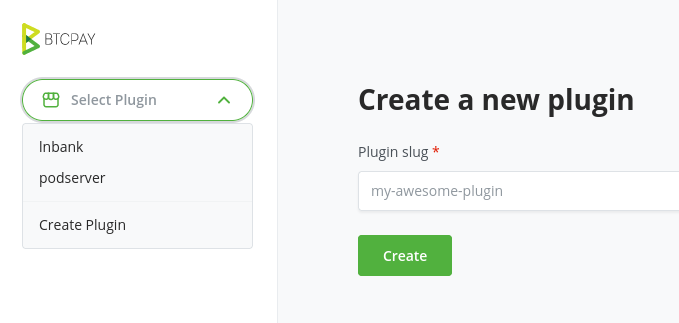
プラグインは plugin builder (opens new window) から公開されます。 この Web UI を使ってサインアップし、プラグインの新バージョンをビルド・提出できます。
新しいバージョンの準備ができたら、新しいビルドを作成できます。 その際、プラグインの Git リポジトリ、ブランチ、プラグインのパスを指定する必要があります。
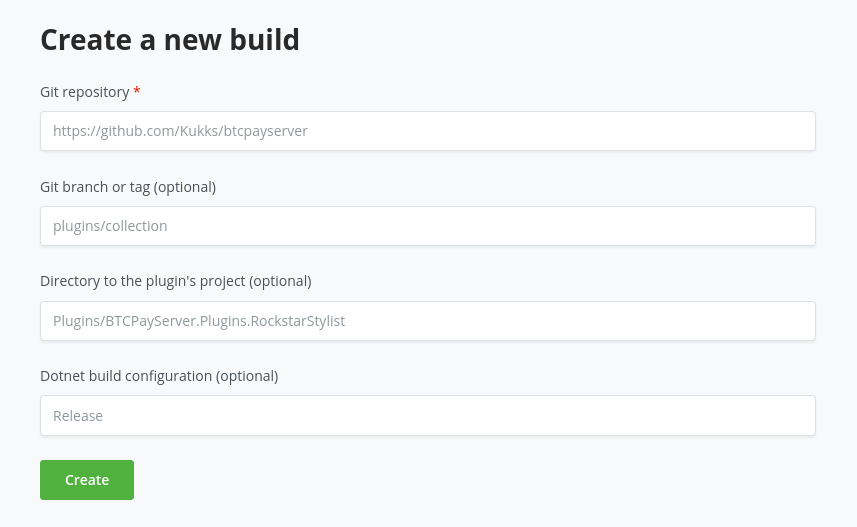
結果として、prerelease 状態のパッケージ版プラグインが生成されます。
prerelease のバージョンは、plugin builder 上で再ビルドすることで更新できます。
任意の BTCPay Server で Server Settings > Policies に移動し、Show plugins in pre-release を有効にして Save すると、prerelease プラグイン一覧を参照できます。
ビルドページで Release ボタンを押すと、パッケージは prerelease ではなくなり、全員に表示されます。
一度リリースしたパッケージは、同じバージョン番号では新しいビルドを公開できません。
そのため、プラグインに調整を加えて再公開する前に、csproj の <Version> を上げる必要があります。
# プラグインに関する重要なお知らせ
プラグインは第三者によって開発されています。 BTCPay Server 本体に加えて、継続的な更新と保守が必要です。
自己責任で利用してください: このストアのプラグインは、独立した第三者が開発したものです。これらのプラグインは BTCPay Server チームによるレビューを受けていません。
責任の免責: BTCPay Server のコントリビューターまたは Foundation は、プラグインの導入または利用により生じたいかなる損害・損失についても責任を負いません。インストール、利用、ライセンスや利用規約の理解、および保守についての責任は、すべてユーザーが負います。
公式な推奨ではありません: BTCPay Server プラグイン一覧に含まれていることは、品質・安全性・互換性を保証または推奨するものではありません。
事前調査を推奨します: プラグインを導入する前に、十分に注意し、独自に調査するかコミュニティへ相談することを推奨します。
フィードバックと報告: プラグインで問題が発生した場合は、該当プラグインの開発者へ直接フィードバックまたは報告を行ってください。
# Resources
詳細は、既存プラグインを提供している次のリポジトリを参照してください。